 photoartflight
Focus Stacking For Extreme Depth Of Field
Posted on November 17, 2019

It is getting much colder outside lately and not too many interesting subjects to photograph and post. But during some of our walks I collected a few leaves to photograph in my home studio for showing Focus Stacking for sharp detail (sharp focus) across the whole subject from front to back. There are specialized programs for this but I rely on Photoshop & Bridge for most of my workflow. The newest Bridge version (2019) seems to have some problems with Focus Stacking, so I used the 2018 version of Bridge for these. I had done a Macro Workshop at my local Camera Group, so I had a few printed backgrounds to use for backgrounds for my test images here. Even at f/32 with a 100mm macro lens, I could not get my subject Oak Leaf all in focus in one shot. I also did not want to use a 50mm macro because it would distort the shape of the leaf because of the shorter focal length. I purposely chose a large long 11 inch leaf for this to demonstrate the technique. Using Studio Flash for my tests allowed me to select f/stops that I wanted to use for my test images. The featured image I started with is 15 images @ f/8. Shooting a series of focused areas from the tip of the stem to the top tip. Even at f/8, 15 images was more than I needed.

Single Shot Image @ f/32 – Stem is soft

Start of a Series of 8 images @ f/8
The above is the start of an 8 image series shot @ f/8. Turned down power on the studio flash for shooting @ f/8

Here is a series of 15 images shot, but only selected every other one for a 8 shot series (shot f/8) for this grouping.
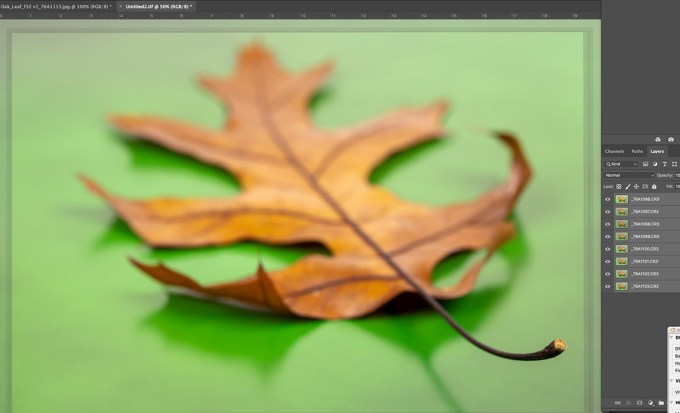
The 8 selected images from above series, showing image alignment in a layered Photoshop file before blending. You can see “edge” banding on the edges from the alignment process of image shift from different focus spots on each of the different images. (In Photoshop – Edit -Auto Align). Then once the “layers” are aligned, Go to Edit, Blend to merge the images into a final image. Once Blended the gradation banding Disappears and for the final image you can “Flatten” all the layers into 1 layer.

Final 8 Image Blend – leaf sharp from top to stem. Leaf Images shot @ f/8
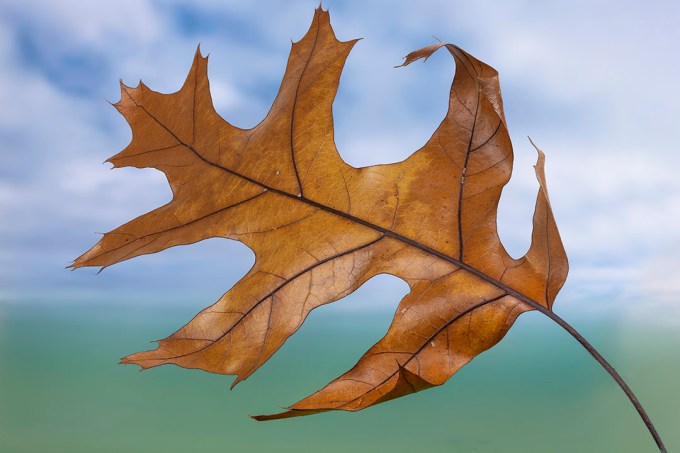
Oak Leaf 8 Image Stack @ f8

Oak Leaf 10 img Stack @ f8 – On Green Background

Oak Leaf 3 Image Stack @ f/32 – the smaller the f/stop you use the fewer focus points you need.
It takes some practice to get used to what f/stop to use and how many focus points to have along your stack. The f/stop also varies on how much light you have. Using studio flash you have more control of your power settings to make choices, but out in the field you have to work with the light you have and your chosen ISO. Once you get used to doing them you are more confident in the final image. With practice you can also get good results when just hand holding the camera for image stacking, not requiring a tripod. In future posts I will work on showing making Panoramas in Photoshop. Panoramas are more forgiving than Stacking when when shooting handheld.
 photoartflight